
Dropped your iPad and now the screen keeps flickering, the battery drains too fast, or it only charges at certain angles? We handle these problems every day at Tech world in Burton. Our Apple iPad Repair Burton service covers cracked screens, charging faults, water damage, frozen iPads, and Apple Pencil issues with same-day repair available for many common faults.
Call or Walk In – Get Your iPad Fixed Today
We’re not a big mail-in repair chain where your iPad disappears for a week. People around Burton, Fishbourne, Bosham, and nearby PO19 areas usually come to us because they want straightforward advice and repairs that actually last. At Tech World, we use tested replacement parts, free diagnostics, and realistic turnaround times without pushing repairs your device probably doesn’t need.
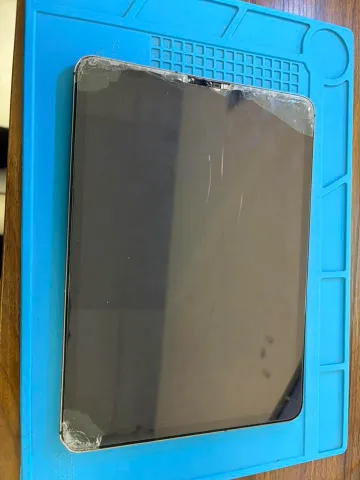
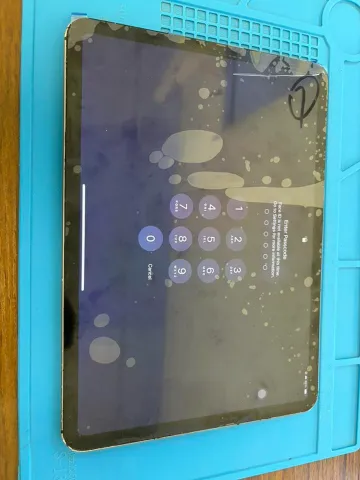
From older iPads still used daily at home to newer M-series devices, we repair the full range at Tech World. Customers looking for Fast Apple iPad Air repair Burton often bring in iPad Pro models, iPad Mini devices, 10th Gen iPads, and tablets with Apple Pencil connection problems, ghost touch, or charging faults. If the device is still worth repairing, we’ll usually tell you honestly before any work starts.



A lot of iPads coming into the shop have the same kinds of faults, cracked screens, charging issues, battery drain, or random freezing after updates. Users searching for a same-day iPad Pro fix usually want quick answers without being pushed into expensive replacements. We repair older and newer iPads daily using tested replacement parts, proper fault testing, and realistic repair advice.
Ghost touch, screen flickering, or poor Apple Pencil response can make an iPad frustrating. We replace damaged digitizers and LCD assemblies carefully, then check touch sensitivity, brightness calibration, and bent frame pressure points properly before sealing the device back up.
Bent corners make iPads feel loose in the hand and easier to damage again later. We replace damaged panels carefully, colour-match the housing properly, and check structural strength so wireless charging and frame alignment still work as they should afterwards.
Battery swelling, or overheating, usually means the charging cycle health has dropped too far. Our iPad Pro repair Burton service includes battery testing, safe removal, and high-capacity replacement cells fitted using ESD-safe repair equipment and proper adhesive bonding techniques.
USB-C charging faults are not always caused by the port itself. Sometimes it’s dust buildup, charging IC faults, or corrosion starting underneath the connector pins. We inspect charging problems first before replacing parts, helping avoid unnecessary costs while restoring stable charging.
Liquid damage gets worse quietly, and we check for liquid corrosion, power IC faults, and motherboard damage using ultrasonic cleaning, liquid diagnostics, and board-level repair techniques where recovery still looks realistically possible.
Speaker distortion, low call volume, or microphones cutting out during video calls are faults we often deal with. We test damaged audio components and replace failing parts where needed so videos, calls, and voice recordings sound clear again without affecting nearby hardware.
We also fix Face ID issues, stuck Apple logos, boot loops, overheating, camera lens damage, WiFi connectivity faults, and iPadOS software problems. Customers searching for genuine-quality parts often bring devices that keep restarting, show black screens, or stop charging completely after liquid exposure.
A lot of people come to us after being told their iPad is “beyond repair” somewhere else. Sometimes it really is. Sometimes it just needed somebody to diagnose the fault properly first. As a top-rated iPad repair service near Burton, we keep things straightforward, honest advice, realistic repair times, and tested replacement parts fitted using ESD-safe repair equipment instead of rushed shortcut repairs.
many common iPad faults repaired within a few working hours
Apple tablet repairs handled daily by experienced repair technicians
full repair quotes explained before work begins
cover included on completed repair work and fitted parts
sensitive components repaired safely using specialist repair tools
your personal files and accounts stay private throughout repairs
A lot of people around Burton check Apple repair prices first, then realise the nearest appointment is not exactly nearby either. Local repair usually makes more sense for out-of-warranty iPads, especially older models Apple may no longer support properly. At Tech World, people deal directly with the technician repairing the device, get realistic turnaround times, and avoid sending the iPad away for days over smaller faults.
An iPad usually breaks at the worst possible time. Right before work, during online classes, or halfway through something important. People needing Urgent broken iPad repair near Burton often want answers quickly, not vague timelines or week-long delays. We keep diagnostics fast, explain faults clearly, and aim for same-day repairs on many common issues where parts are already available locally.
Most people just want to know two things first, what’s actually wrong with the iPad, and how much it’s going to cost to fix. As a Professional iPad repairing shop near Burton, we keep the process simple. Walk into our East Street workshop for free diagnostics, clear repair advice, multi-point testing, and same-day turnaround on many common iPad faults where parts are already available.
Repair cost is usually the first thing people ask us, especially when the iPad is already out of warranty. As a Local iPad repair Center Burton, we keep pricing straightforward and explain whether the repair still makes financial sense before starting any work. Student discounts are available on selected repairs, and unlike some Apple Store quotes, there are no surprise add-ons later after the device is opened.
burton@techworlduk.co
+447436153636
A lot of DIY repair videos make iPad fixes look easier than they really are. Then the device comes into the shop with torn flex cables, damaged logic boards, or screens lifting because the adhesive bonding failed later. Without proper heating tools, ESD-safe handling, and careful fitting, small mistakes get expensive quickly. In most cases, professional repair ends up cheaper than fixing a failed DIY attempt afterwards.
The bigger problem is usually small things getting ignored for too long, battery strain, overheating, cheap charging cables, dust packed into the charging port. It adds up. Keeping iPadOS updated and sorting battery health problems earlier rather than later genuinely helps. A simple repair at the right time often buys the device a few more solid years before replacement even becomes necessary.
Constant overheating isn’t normal. Sometimes it’s battery health getting worse quietly in the background. Other times it’s charging faults, heavy background activity, or power IC problems creating excess heat inside the board. If the iPad keeps getting unusually hot during light use, it’s better to stop pushing it and get the fault checked before heat starts damaging other internal components too.
People visit us from across Burton, PO19, and nearby parts of Chichester West Sussex because the shop is easy to reach from East Street, South Street, and Terminus Road. We regularly repair iPads for customers coming from Bosham, Fishbourne, Selsey, Havant, Arundel, Worthing, West Wittering, and Littlehampton, especially those already heading into town near Chichester Cathedral or the Festival Theatre.
Sometimes it starts with small dead areas near the edges. Other times the whole screen freezes after a drop. We regularly see ghost touch issues, flex cable damage, and failing digitizers causing this around Burton. A proper inspection usually tells us pretty quickly whether the problem is the screen itself or something deeper on the board.
Sometimes, yes. But the longer liquid corrosion sits inside the device, the worse recovery chances become. We’ve had customers from Fishbourne and Bosham bring in iPads weeks later that still turned out repairable after ultrasonic cleaning and board-level work. Other times the corrosion has already spread into the charging circuit or motherboard by then.
Boot loops after updates are more common than people think, especially on older iPads with weak battery health or storage issues. We usually check for software corruption first, but sometimes the update simply exposes an existing logic board fault that had been quietly developing already.
Honestly, yes. Charging cycle degradation catches up eventually, especially on iPads used heavily for streaming, gaming, or school work. If the battery starts dropping unusually fast or the iPad overheats during charging, it’s usually a sign the battery health has deteriorated more than people realise.
Definitely. A lot of people assume slow charging is “just the cable,” then leave it for months. Corrosion around the charging port or charging IC can spread further into the board over time. We see this regularly on iPads exposed to moisture, kitchen steam, or cheap charging accessories.
Crackling speakers or distorted audio usually points to speaker wear, trapped debris, liquid exposure, or microphone faults nearby. We also see this happen after drops where internal audio connections loosen slightly. The good news is most of these faults are repairable without replacing the whole device.
A lot of them are, actually. We still repair older 5th, 6th, and 7th generation iPads for customers around Burton, West Sussex because they still handle streaming, browsing, and schoolwork perfectly fine. Usually it comes down to whether the repair cost still makes sense compared to replacing it.
That’s usually a sign something in the background is not behaving normally. Sometimes it’s battery strain. Sometimes charging faults or power IC issues. We’ve also seen overheating caused by apps stuck looping after updates. If the iPad feels hot during light use, it’s worth getting checked before heat starts damaging nearby components.
Yes, more than people expect. Even a slightly bent frame can create pressure against the LCD assembly or digitizer, leading to screen flickering, touch problems, or screens lifting again after replacement. We always check frame alignment before fitting a new screen because otherwise the same fault can return later.
Apple Pencil connection faults are often linked to software glitches, charging problems, damaged internal sensors, or board-level communication faults inside the iPad itself. We regularly test this for customers coming from Havant, Selsey, and nearby areas because the issue is not always the Pencil, sometimes it’s the iPad hardware causing the problem instead.
Have a question? Need some help? Get in touch with us.
Monday – Saturday:
9:00 a.m. to 5:30 p.m.
Sunday:
10:00 a.m. to 4:00 p.m.
© Copyright 2024 – Tech World | All Rights Reserved.