
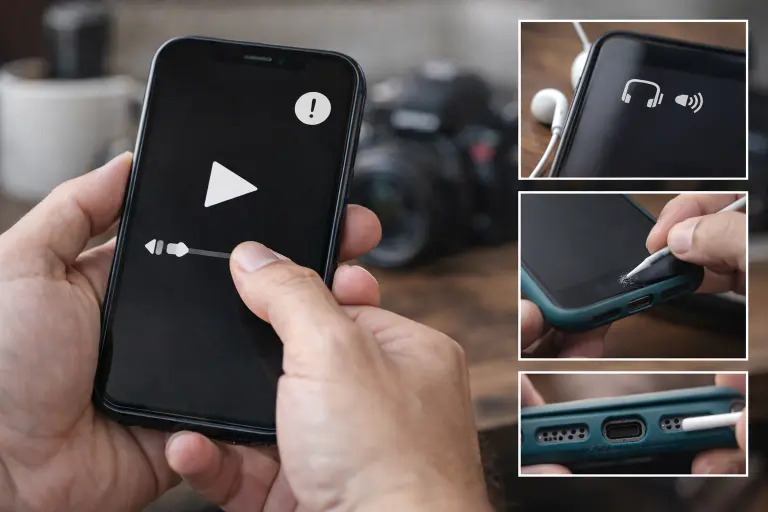
You tap play… nothing. No sound on calls. Videos feel dead. Even notifications disappear. If your phone speaker not working issue showed up out of nowhere, it’s frustrating, but it’s also one of the more common smartphone problems. Most of the time, it’s not serious. A setting flipped. Bluetooth still connected. Or the phone stuck in headphone mode without you realising.
Sometimes it’s physical. Dust builds up slowly in the speaker. Sound drops little by little until it feels gone. I’ve seen it happen more than people expect. Even a tight case can block the output.
What usually happens, people panic and think the speaker is gone. It usually isn’t. A lot of problems on Android phones like Samsung Galaxy, Xiaomi, Google Pixel, OnePlus, and even iPhone (iOS) come down to simple things you can fix in a few minutes
Start simple. Work through it step by step. In most cases, you’ll fix it before you even think about repair.
Why has my phone speaker suddenly stopped working?
In many cases, people rush into random fixes. That’s where time gets lost. If you’re dealing with a speaker not working on phone issue, it usually points to something small rather than a major fault. When you’re dealing with a smartphone speaker issue, it’s usually not complicated. It just feels that way. In most cases, the problem falls into one of a few familiar patterns.
What usually causes it
- Settings issues
Silent mode, Do Not Disturb, or volume dropped to zero. Simple, but easy to miss. - Software glitches
A buggy app, recent update, or small system error can break audio routing. - Physical blockage
Dust inside the speaker grill or even a tight case can slowly kill sound. - Hardware damage
Water exposure, drops, or wear over time. Happens, but not the first thing to assume.
Quick way to narrow it down
Try headphones or Bluetooth. If sound works there, the phone isn’t fully silent. It’s likely a speaker hardware issue or routing problem. If nothing works anywhere, you’re probably dealing with a settings or software fault. Start with that. It saves time, and guesswork.
How to fix my phone speaker with a simple restart?
It sounds obvious. Still worth doing. If you’re dealing with a phone sound issue, a proper restart often clears it. No tools. No settings digging. Just reset the system and see what changes. You end up with phone audio not working, even though everything looks normal.
Do it properly
A quick tap won’t help. You need a full reboot.
- iPhone
Volume Up → Volume Down → hold Side button until the Apple logo - Samsung Galaxy
Hold Power + Volume Down for a few seconds - Google Pixel
Hold Power, or use Power + Volume Down on newer models - Xiaomi / OnePlus
Hold Power for about 10 seconds, then restart
What to check after
Play something simple. Video. Ringtone. Voice note.If sound comes back, it was just a software bug. Happens more than people admit. If nothing changes, don’t repeat it. Move on.
Could my phone settings be causing the speaker to stop working?
Yes, and it’s more common than people expect. If you’re dealing with a phone audio not working issue, don’t assume damage straight away. A lot of the time, it’s just the way sound is configured on the device.
Check your volume channels first
Phones don’t use a single volume. There are separate levels for media, calls, ringtones, and alarms, and they don’t sync.
- Media volume → videos, YouTube, WhatsApp
- Ringtone volume → calls and alerts
- Call volume → during calls only
- Alarm volume → timers and alarms
If your media sound not working but calls are fine, the media channel is likely muted. Go into Sound settings and check each one properly, not just the main slider.
Silent mode and Do Not Disturb
Phones can turn on Do Not Disturb automatically, overnight or during work hours, and people forget it’s active. Same with silent mode. On Android, check quick settings. On iPhone, open Control Center and look for the moon icon.Turn it off. Test again. Simple.
Check for Bluetooth audio issues
This one catches a lot of people. Your phone connects to a car or speaker earlier, then disconnects, but still routes audio there. You end up with no sound on phone, even though everything looks fine.
Go to Bluetooth settings and switch it off completely. If sound comes back, reconnect and remove the old device (“Forget Device”) to stop it happening again.
Quick check that saves time
Before moving on, look for any connected device still showing as active. On Android, this is under Connected Devices. Fixing settings takes seconds, and in many cases, that’s all it takes. No repair needed.
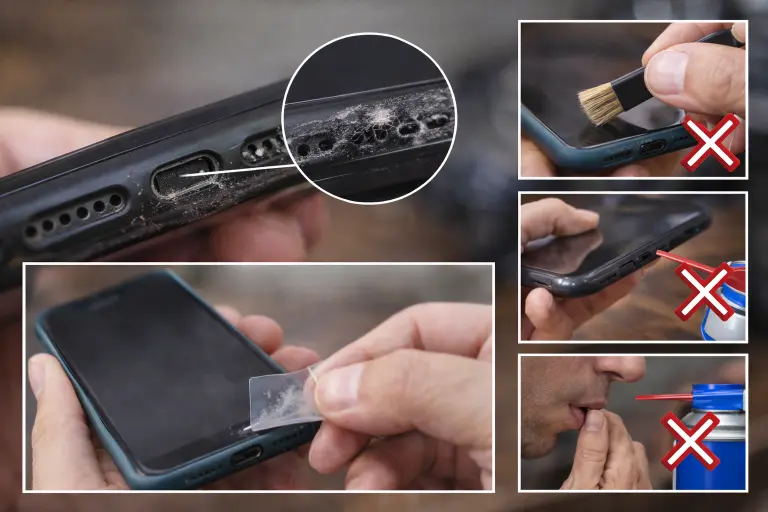
Can a dirty speaker grille cause my phone to have no sound?
Yes. Happens more than you’d think. Usually not sudden. The sound just drops over time. Dust builds up, bit by bit. You don’t notice it at first. Then one day it feels off. Low. Dull. That typical muffled phone speaker effect, often the real reason why phone volume is low. Before assuming anything serious, check for a speaker grill blockage. In day-to-day use, that’s common. Phones in pockets pick up lint fast. Repair techs see this all the time.
How to clean it safely
Start simple.
- Use a dry brush. Light strokes across the grille. Nothing aggressive.
- Compressed air helps, but keep distance. Short bursts only.
- Stubborn lint? A bit of tape can lift it off.
- Remove the case and test. Some cases cause a low volume phone fix situation without you realising.
What not to do
- Don’t blow into the speaker. Moisture makes it worse.
- Don’t push anything sharp inside.
- Avoid liquid on the grille unless you’re sure it’s safe.
If the sound improves, it was likely speaker blocked dust. Not a hardware issue. If nothing changes, leave it. Move on to the next check.
What should I do if my phone speaker stopped working after getting wet?
If water got into the speaker, timing matters a lot. So don’t test it. Don’t press buttons just to check. That’s usually where things go wrong.
What to do straight away
- Power it off
Not later. Now. Water and electricity don’t mix, that’s how internal parts get damaged. - Don’t shake the phone
It feels instinctive, but it pushes moisture further inside. - Try a water ejection tool
Apps like Fix My Speaker or Sonic V can help push water out using sound. Not perfect, but worth trying early. - Use silica gel — not rice
Put the phone in a closed box with silica packets for a day or two. Rice doesn’t pull moisture out properly. It just sits there.
Give it time. Then test. If the sound comes back, you caught it early. If not, it may have reached deeper, and that’s when you may need to fix water damage on phone properly.
How do I fix my iPhone speaker that suddenly stopped working?
If you’re dealing with an iPhone speaker not working issue, don’t jump straight to repair. Most of the time, it comes down to settings or a small software glitch, especially after updates. Start with the basics. It sounds obvious, but it fixes a lot.
What to check first
- Ring/Silent switch
If you see orange, it’s on silent. Happens more than people admit. - Bluetooth
Turn it off and test. Audio sometimes gets stuck routing elsewhere. - Volume and sound settings
Go into Sounds and Haptics. Make sure nothing is sitting at zero. - Accessibility settings
Check Audio/Visual. If the balance is off, one side can go silent.
If that doesn’t help, try a restart. Then move on.
If it started after an update
This often happens after updates. Not common, but not rare either. If you’re seeing no sound on phone after updating, it’s usually fixable.
Go to Settings → General → Transfer or Reset → Reset All Settings. It won’t delete your data, just resets system settings.
Quick trick worth trying
Turn Mono Audio on… then off again. It sounds odd, but it forces the system to remap audio output. Takes a few seconds. Sometimes that’s enough.
Real case
An iPhone 14 Pro lost all sound right after an update. No ringtone. No media. Nothing. Reset All Settings fixed it in minutes. No repair needed. If none of this works, then you’re likely looking at a deeper issue, but most cases don’t get that far.
How do I fix my Android phone speaker that is not working?
When sound disappears and mobile speaker not working on Android phones, it doesn’t always mean something is broken. Quite often, it’s just an app interfering or a small system issue that’s easy to miss.
Check with safe mode first
Safe mode strips the phone back to basics. No third-party apps running. That’s what makes it useful. Press and hold the Power button. When the menu appears, hold “Power Off” until the safe mode option shows. Restart into it and test the speaker. If the sound comes back, you’ve found the problem. One of your apps is causing the conflict. Go back to normal mode and remove recent apps one by one.
Samsung-specific checks
On Samsung Galaxy phones, sound settings can sometimes interfere without it being obvious. Features like Dolby Atmos can affect audio output in certain apps. Try switching it off and testing again.
There’s also a built-in test tool. Dial #0# in the phone app and run the speaker test. It gives a quick answer, software issue or something deeper. If nothing changes after this, don’t force it. Move on to the next step instead.
What are the best apps to test and diagnose your phone speaker?
Before assuming anything serious, it’s worth testing the speaker properly. A quick check can tell you whether you’re dealing with a glitch or an actual hardware issue.
Here are a few tools that people actually use:
| App | Platform | Use |
| Fix My Speaker | iOS / Android | Pushes out water using sound |
| Phone Doctor Plus | iOS / Android | Full device diagnostics |
| Speaker Check | Android | Detects weak or dead sound ranges |
| TestM | iOS / Android | Runs a complete hardware test |
| Sonic V | Android | Useful for clearing moisture |
If you don’t want to install anything, just use an online tone generator. Play audio at different levels. A healthy speaker sounds clear. If you notice distorted sound or uneven output, something isn’t right.
How do I know if my phone speaker is damaged?
When you’re dealing with an Android speaker not working situation, people assume the worst too quickly. In reality, many cases turn out to be software or settings. Still, there are a few signs that point towards a real speaker hardware issue.
Signs to look for
- Sound crackles even at low volume
- Audio cuts out completely while headphones still work
- No response during testing
- Issue stays even after reset or safe mode
- Visible damage near the speaker area
A technician will usually confirm this with a quick test before recommending anything. Most don’t jump to replacement straight away, because in many cases, the speaker itself is still fine. If the issue checks all the signs above, then you’re likely looking at a repair. If not, keep troubleshooting. It’s often something simpler.
Are there myths about fixing phone speakers that you should ignore?
Yes. And some of them quietly make things worse. You’ll see the same advice everywhere. Sounds right at first. Doesn’t really work when you try it.
What people get wrong
Rice fixes water damage
People still do this. It doesn’t dry things properly. Moisture stays inside while rice just sits there.
Blowing into the speaker helps
It feels like it should clear dust. In reality, you’re adding moisture. That’s where damage starts.
Turning volume to max clears blockage
It won’t. If anything, it strains the speaker more. Especially when the sound is already off.
A reset will sort it out
Only if it’s a system issue. Dust, moisture, or damage? A reset won’t touch that.
Only official repair shops are safe
Not always. Plenty of independent shops do solid work. What matters is parts and experience, not the logo.
One quick example
After a gym session, a Samsung Galaxy user lost speaker output. Earphones worked fine. Speaker didn’t. Turned out to be moisture in the port triggering a headphone mode stuck issue.
A quick clean. Restart. Done. No repair, no cost.
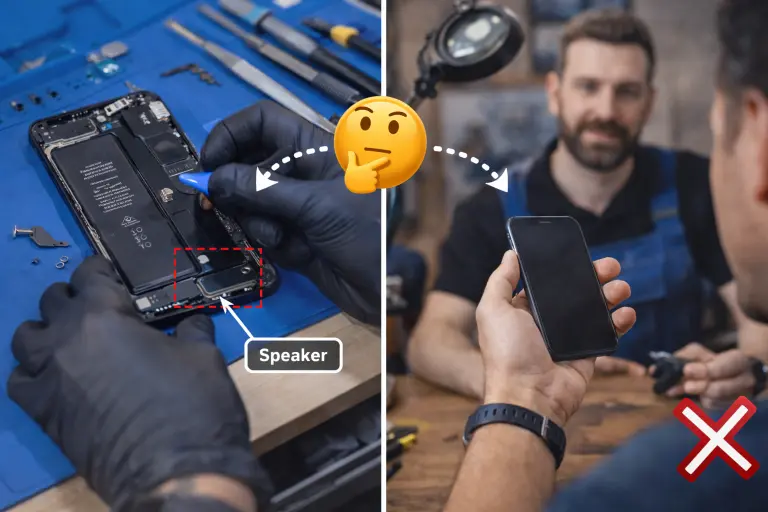
Should I repair the speaker myself or take it to a shop?
By this point, you’ve probably tried the basic fixes. If the issue is still there, the question becomes simple, fix it yourself or let someone handle it. There isn’t one answer. It depends on the phone, the cost, and how confident you are opening it.
When repair actually makes sense
If the device is still fairly new and the problem is limited to the speaker, professional phone speaker repair service is usually the better option. In many cases, the speaker replacement cost sits on the lower side compared to other hardware fixes. Local repair shops handle this kind of work every day. A good technician can confirm whether it’s a real speaker hardware issue or something else within a few minutes. That check alone can save unnecessary expense.
If the phone is under warranty, it’s worth going through official support first. Otherwise, a trusted third-party shop is often quicker and more affordable.
When it’s better to move on
If the phone is older, has multiple issues, or the repair cost starts getting close to half its value, it usually isn’t worth it. At that point, putting that money towards a replacement makes more sense. DIY is an option, but only if you’re comfortable with small components. Modern phones aren’t built to be opened casually. One wrong move and the cost goes up instead of down.
Simple habits that prevent repeat issues
Once your audio is working again, a few small habits help avoid the same problem later.
- Keep the speaker area clear. A quick clean helps clean phone speaker buildup before it becomes noticeable.
- Avoid pushing volume to the limit for long periods. That’s how speakers wear out.
- Watch for moisture. Even light exposure over time can turn into a water damage speaker fix situation.
- If sound suddenly shifts again, check connections first. A Bluetooth audio problem or routing issue is still one of the most common causes.
Many people assume the worst too early. In reality, a quick check, either by yourself or a technician, usually makes the decision clear without guesswork.