


It is 7:43 AM on a Tuesday. You are already running late. You turn the key and hear nothing. Completely dead. No warning, no slow fade, just silence. You grab your phone to call for help, and the battery is at 3%. Your laptop bag is in the backseat with a charger you forgot to plug in last night. Three devices. Three battery failures. One terrible morning.
Here is what gets me every time I hear this story: almost all of it was preventable.
I have spent years working with devices at Tech World, diagnosing everything from corroded car battery terminals to swollen phone batteries that were days away from a serious incident. What I have learned is that battery problems follow patterns. The same mistakes show up again and again across phones, laptops, smartwatches, and tablets.
What if 80% of common battery issues trace back to three root causes? Heat, improper charging habits, and ignored early warning signs. This guide covers all three, across all your devices, with real fixes you can start today.
What You Will Find in This Guide
By the end of this article, you will know how to diagnose your specific battery problem, whether it is a tablet, phone, or laptop. You will get step-by-step fixes, honest cost breakdowns for 2026, and tool recommendations based on real experience. Most fixes here take under 30 minutes. Some cost nothing at all.
We cover battery-draining fast fixes, batteries that won’t charge, swollen batteries, percentage jumping, cold-weather failures, overheating during charging, and the truth about when replacement is and is not worth it.
Tools referenced include AccuBattery, CoconutBattery, NOCO Genius chargers, ANCEL AD310, and iFixit toolkits. Costs range from $0 for software fixes to around $200 for full replacements. Let us get into it.
Why Does My Battery Drain So Fast?
Battery draining fast is the most common complaint we see at Tech World, and the cause is rarely what people assume. Most people blame the battery age first. In reality, background apps, poor signal strength, and screen brightness settings are responsible for the majority of fast-drain cases.
When your phone is in a weak signal area, it constantly boosts its radio power, trying to find a connection. That alone can drain a fully charged battery in four to five hours. When you add location services running in the background, a social media app refreshing every two minutes, and maximum screen brightness, you create a situation where your battery could be dead by noon.
If your battery still drains quickly, it may need a phone battery replacement.
How to Diagnose Fast Battery Drain Right Now
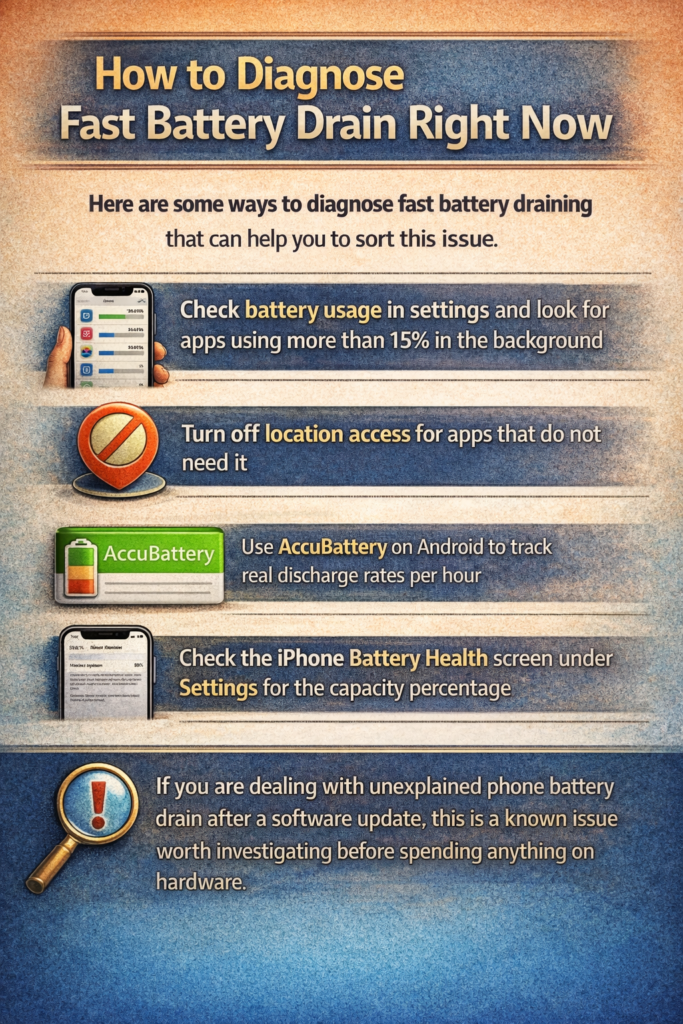
Here are some ways to diagnose the fast battery draining that can help you to sort this issue.
- Check battery usage in settings and look for apps using more than 15% in the background
- Turn off location access for apps that do not need it
- Use AccuBattery on Android to track real discharge rates per hour
- Check the iPhone Battery Health screen under Settings for the capacity percentage
If you are dealing with unexplained phone battery drain after a software update, this is a known issue worth investigating before spending anything on hardware.
What Does It Mean When a Battery Won’t Charge?
A battery not charging does not always mean the battery is dead. This scenario is one of the biggest misdiagnoses we see, and it leads people to spend money they do not need to spend.
The most common cause of phones not charging is a dirty charging port. Pocket lint compresses into the USB-C or Lightning port over months until the cable cannot make proper contact. Use a wooden toothpick, never metal, and gently lift out compressed debris from the bottom of the port. I have fixed dozens of “dead batteries” this way without touching the battery at all.
On iPhones running iOS 13 and later, Optimized Battery Charging stops the charge at 80% overnight. Customers frequently bring in phones thinking they are broken when the software is simply doing what Apple designed it to do.
Cost Comparison: Charging Port vs. Battery vs. New Device
| Problem | DIY Cost | Professional Repair Cost |
| Dirty charging port | $0 | $0 to $20 |
| Charging port replacement | $15 to $30 (parts) | $40 to $80 |
| Phone battery replacement | $20 to $40 (parts) | $50 to $100 |
Before you pay for anything, try the port cleaning. You would be surprised how often that is the whole story.
Is It Dangerous If My Battery Is Swollen?
Yes, a swollen battery is not a cosmetic issue. It is a lithium-ion cell that has begun off-gassing, producing hydrogen and other flammable gases inside the casing. The risk of thermal runaway, which means rapid uncontrolled heating that leads to fire, is real and documented. The Samsung Galaxy Note 7 recall in 2016 is the most famous example, but smaller incidents happen every year with lesser-known devices.
How to identify a swollen battery:
- Your phone screen is lifting away from the frame
- The back panel of your phone or laptop is bulging
- The device rocks on a flat surface when it is never used to
- The battery looks visibly distorted
Do not put a swollen battery in the freezer. I have seen this advice on forums, and it is genuinely dangerous. Freezing does not solve the chemical problem and can cause the casing to rupture.
If your battery is swollen, power the device off immediately. Do not charge it. Place it away from flammable materials and bring it to a certified repair shop for safe removal and recycling. At Tech World, we handle swollen battery removals regularly and follow proper disposal procedures because battery disposal regulations differ between the EU, the US, and South Asia, and improper disposal has both legal and environmental consequences.
This is one situation where no article should delay your action. If your battery is visibly swollen, stop reading and deal with it now.
Why Does My Battery Percentage Jump Around Randomly?
Battery percentage jumping is confusing because it feels like the device is lying. It is, in a way. But the battery is not lying. It is usually the battery management system working with stale calibration data.
Modern lithium-ion batteries do not directly measure charge the way a fuel gauge measures petrol. The battery management system estimates remaining charge based on voltage curves and historical data. When that data gets corrupted, after a major software update, for example, the estimate becomes wildly inaccurate.
I had a Google Pixel 6 that would show 34% battery remaining and then die completely. The battery health was at 71% in AccuBattery, which is not great but not catastrophic. A full calibration cycle fixed the jumping percentage entirely without any hardware replacement.
How to Recalibrate Your Phone Battery in 2026
For Android:
- Drain the battery completely until the phone shuts off on its own
- Leave it off for 30 minutes
- Charge uninterrupted to 100% using the original charger
- Leave on the charger for one additional hour after reaching 100%
- Restart and check readings in AccuBattery after 24 hours
For iPhone:
Battery recalibration is handled differently. Apple introduced a built-in recalibration process for some iPhone 11 models through iOS updates. For other models, a full discharge and slow charge cycle is the closest equivalent.
Honest opinion: Battery calibration is largely a myth on modern lithium batteries for restoring lost capacity. But it does fix inaccurate percentage readings, which is a separate problem worth solving.
Why Does My Battery Die Faster in Cold Weather?
Lithium-ion batteries can lose up to 40% of their effective capacity at 32°F (0°C). That is not a malfunction. That is chemistry.
The electrolyte inside a lithium battery becomes more viscous in cold temperatures, which slows the movement of ions between the anode and cathode. Less ion movement means less available power, even though the battery is not actually damaged.
For phones in winter, keep the device in an inner jacket pocket close to your body. The warmth is enough to maintain normal battery performance. Do not leave your phone in a cold car overnight if you can avoid it.
Why Is My Battery Getting Hot While Charging?
Some warmth during charging is completely normal. Lithium-ion batteries generate heat as a byproduct of the charging chemical reaction. A slightly warm phone is not a problem.
A hot phone is a different matter.
The main causes of dangerous overheating while charging:
- Using a non-certified charger that delivers inconsistent voltage
- Charging inside a case that traps heat against the back of the device
- Using the phone heavily while charging, which adds heat from the processor on top of the charging heat
- A failing battery that has developed internal resistance
Fast charging protocols like Qualcomm Quick Charge and USB Power Delivery push more power through the battery in a shorter time. More power means more heat. Manufacturers build in temperature management to slow charging when the device gets too hot, but that system can only do so much if the conditions are already extreme.
Based on data from Battery University, heat above 40°C accelerates lithium-ion degradation significantly. Every 10°C increase in sustained charging temperature roughly doubles the rate of capacity loss over time.
What to do:
- Remove the case during charging if the phone gets noticeably hot
- Use original or MFi-certified chargers only
- Avoid using the phone for demanding tasks while charging
- Never charge on a bed or couch that blocks heat dissipation
If your device consistently overheats during charging, our phone battery diagnostic service at Tech World can identify whether the problem is the charger, the port, or the battery itself.
When Should I Replace My Battery?
Here is the honest answer most people would rather not hear: not always when you think.
For phones, the commonly cited threshold is 80% battery health. Below that, you start noticing real performance impact. Apple charges $89 for an official iPhone battery replacement as of 2026. Third-party options run $35 to $50. At Tech World, we source quality cells and can handle most iPhone and Android battery replacements the same day.
Battery Replacement Cost Guide (2026)
| Device | Official/OEM Cost | Third-Party Cost |
| iPhone (Apple Store) | $89 | $35 to $50 |
| Samsung Galaxy | $50 to $75 | $25 to $45 |
| MacBook (Apple Store) | $129 to $199 | $60 to $90 |
| Laptop (third-party) | N/A | $40 to $80 |
I replaced my own laptop battery once. Saved around $90. Also cracked the chassis on reassembly and voided the warranty. Some repairs are worth doing yourself. Others genuinely are not. Knowing when to get professional battery repair help saves you money in the long run.
What Are the Biggest Battery Myths You Should Stop Believing?
Myth 1: You should fully drain your battery before charging it.
This was true for nickel-cadmium batteries in the 1990s. Lithium-ion cells actively prefer partial discharge cycles. Deep discharges to 0% put stress on lithium batteries. Charge when you feel like it.
Myth 2: Leaving your phone plugged in overnight destroys the battery.
Modern smartphones stop drawing current when they reach 100%. The trickle charge that maintains 100% overnight is minimal. What does more damage? Sustained high temperatures, not the charging itself.
Myth 3: Third-party chargers always damage batteries.
Quality certified chargers from reputable brands are perfectly safe. The dangerous ones are uncertified, unbranded chargers that deliver inconsistent voltage. Look for UL certification or MFi certification on Apple accessories.
How Do I Make My Battery Last Longer Starting Today?
Five changes you can make in the next five minutes:
- Set your screen brightness to auto-adapt instead of maximum
- Turn off location access for apps that have no reason to track you
- Enable battery optimization for background apps in settings
- Charge between 20% and 80% when possible, rather than 0% to 100%
- Keep your device at room temperature during charging
Studies show that consistently charging between 20% and 80% can roughly double the total number of charge cycles before significant capacity loss. That means your battery genuinely lasts twice as long before it needs replacing.
Honest take on battery-saving apps: AccuBattery is worth using for monitoring and data. Most other third-party battery saver apps do little more than what your phone’s native settings already handle. Do not pay for them.